How to change the decimal notation
The Sagitta calculator may use scientific notation by default:
small numbers such as \(0.000032\) are shown as \(3.2 ^{-05}\) or \(3.2e\text{-}05\)
large numbers such as \(12000000\) are shown as \(1.2^{07}\) or \(1.2e\text{+}07\)
If you prefer to see these numbers written out in full, do the following:
Press the Mode button in the upper right several times until you see the screen below.
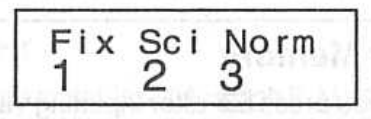
Press 3 to choose the Norm mode.
Press 2 to choose Norm 2. This mode switches to scientific notation only for very small and very large numbers.